Showing posts with label Marketing Tips. Show all posts

10/08/2014

Getting More from Your Blog

How to Let Your Blog Work for You CUDigitals

Did you know your digital scrapbook design blog should be doing more for you than just acting as a repository for your product ads, announcements and current thoughts about your design work? It should also act as a central hub for people to find you and your designs through organic (non-paid) search.

In order for that to happen, you should take these simple steps to improve your chances of being "found" in a search

1. Include credits under every digital scrapbook page image or grouping of images. 
If it is your kit, make sure you type out your entire design name and kit name. It's not enough to say "here's what my CT did with my latest kit" and then add the images. Google won't index any of that to create traffic for you because it doesn't point to your name or the kit name. 

2. Include an "alt" image name for all your previews and page samples AND links
Type out the ENTIRE THING such as Big Boo Digital Kit by Super Scrappy Chick, Big Boo Digital Scrapbook Elements by Super Scrappy Chick, Big Boo Boo Digital Word Art by Super Scrappy Chick. This can be done in WordPress, Blogger or my favorite, Windows Live Writer.

3. Stop using jargon on your blog.
I *know* it's a lot of extra typing to do a blog post with every word written out. However, your posts are out on the internet 24/7 so they should be DOING something for you after you've shared them with your fans. So don't use things like "CT LO" or initials for your store or even "digi" instead of "digital scrapbooking" (U.S. readers seem to favor this;  "digiscrap" is preferred elsewhere). You should be as descriptive as possible with words like "new digital scrapbooking kit" or "digital scrapbooking page layout" or "digiscrap quickpage."

These techniques definitely create results over time. There were many instances on my own blog that I looked at analytics and found that people came to my blog from a search for a store name where I sold, or even a DIFFERENT DESIGNER name because I had credited her for one of my personal page layouts. There was a year that I worked a contract job for a large paper scrapbooking company that netted me over $10,000 after being found in organic search for "digital scrapbook designer." Your blog CAN work hard for you if you are providing good content. And remember, it should just be all about YOU - here is an additional article for your reference on keeping the focus on your customers.

10/01/2014

How to Use Creative Free Downloads to Drive Traffic


Although it is common practice in digital scrapbooking to provide freebies for blog visitors, newsletter subscribers and fans, it is a good practice to make sure you are not giving away so much that nobody ever needs to buy anything from you! Getting your free mini kit or quick page or alpha “picked up” by one of the freebie promo blogs or pages feels great and will definitely bring visitors to your page but have you ever considered other types of freebies you could offer? In addition to mini kits, clusters, add-ons and other things meant just for digital scrapbookbooking, there are quite a few options for free downloads that bring new traffic but don’t hurt your sales.

Free printables are extremely popular on Pinterest. Creating them and pinning them with hashtags can bring lots of extra traffic to your blog – and many times it will come from people who are new to your blog. It’s important to know that lots of visits to your blog helps you show up in organic search on the big search sites like Google, Bing and Yahoo. That means if you have a blog post for your latest Halloween Digi Kit and someone uses search to find Halloween kits, YOU may rank higher on the results page. 

You may be wondering if this traffic would ever turn into sales for you right away? Will more people buy the kit used to make the printable? This obviously depends on the visitor but I very often see women pinning these types of items as well as a large range of other crafty items including digital scrapbooking. And don’t forget about the people who follow these pinners! You can get a good amount of reach with a good printable freebie. This is a very important part of having a good blog presence.

BEST PRACTICES
  • create a separate blog post for the printable – don’t include it with a new release.   
  • Use “Free Printable” in the title of the post  
  • Of course, include a link to the blog post that has the kit information!  
  • Make a great preview of the item so people will want to visit your blog and also pin your item – wherever possible show the finished product and include the words Free Printable on the preview 
  • ask your Creative Team to pin your freebie  
  • share on Facebook, Twitter, etc with hashtags #free #printable 
  • include the freebie as a .jpg and .pdf for the ease the user  
  • create a simple, separate TOU to include in the download – if it is full of digiscrap jargon, people will not know what they can do with it

THINGS to AVOID
  • don’t use the term “hybrid” in your description – many people simply do not know what this is. Stick with “free printable” 
  • don’t put a copy of the kit preview in the freebie preview – keep the focus on the item you are offering for free 
  • don’t create items that are super complicated to construct unless you are prepared to include complete assembly instructions 
  • don’t require a newsletter signup or store login to get the printable 
  • don’t include digi acronyms like PU/SH4 on the preview. Spell out words that people outside the community may not know 

WHAT to OFFER
If you haven’t created printables before, start out with something flat and simple – or – ask your Creative Team to create for you if you have someone who is already experienced.

  • recipe cards
  • bookmarks
  • lunch notes
  • thank you cards
  • holiday treat cards or bag toppers
  • menu planner
  • to do list
  • wall art
  • subway art
  • gift labels
  • chore chart
  • punch card
  • date night coupons
  • photo props/signs
  • seasonal photo checklist
  • teacher notes, gifts
  • family time conversation cards
  • postcards 

I have pinned a bunch of possible ideas on this board on Pinterest

And I also asked the digital scrapbook designers who subscribe to our newsletter last week to share any printables they have offered on their digital scrapbooking blogs. I love their ideas! 


Seneca Pond Crafts--


Snickerdoodle Designs by Karen (who also sells at CUDigitals) has these great ideas
1. printable T-shirt transfer

A-Manda Creation
Super clever teacher printable – hand sanitizer label


 I also want to mention a few all-digi options for freebies that are NOT kits – a few popular items are computer desktops and phone wallpapers. Here’s one that our newsletter reader Sus Designs created for her blog. 

I encourage you to make free printables a regular part of your marketing routine. They are a nice gift for your current fans and followers, they will not hurt your sales and they can help drive traffic to your blog, too.

Comment below with questions or let us know if you plan to try this on your blog!


9/24/2014

Do’s and Don’ts For Cold Calling A Digital Scrapbook Store Owner


Are you looking for an opportunity to sell your digital scrapbook designs in a different store than the one you are currently in? Sometimes a "cold call" to a store owner is in order. But do you know what it takes to get noticed?

As a store owner, I have been approached many times and in many different ways about whether I am taking on new designers. In all honesty, some inquiries are impossible to answer because the person did not even leave their contact info. Sometimes you only have ONE chance to make a good impression so here are some possible do's and don'ts when asking if any designer positions are open.

Most store owners want more than
"Do you take new designers?"

How to up your game:
1. DO the legwork or research to find a store email for the owner. If there is only a contact form on the site, that is a possibility but I would recommend trying to find an email. Some possible methods are
• Contact a designer who is selling there that you already have a relationship with
• Place an order (even a freebie) to see the email that order confirmations come from
• Check the from address on newsletter mailings from the store. Hopefully this is a store that you already LOVE and are connected with.
2. DON'T use Facebook/Twitter messages (public or private) or post blog comments to ask about designer openings. First, they don't always deliver to the store owner.  (The dreaded "other" folder on Facebook) Second, they are a terrible way of communicating. I keep copies of all designer correspondence in my email - I don't want to have to go over to Facebook to track someone or something down

3. DO prepare some samples for the store own to look at. Make it EASY for us to get a look at the quality and originality of your designs. I personally like to see three complete products to make a judgment about whether a designer is a good match. Include links to zip files where the store owner can download and review your products.

4. DON'T provide a coupon code for the owner to grab her choice of products from your store. I personally do not want to go register at a new store and go through the checkout process to have a look at someone's work. The onus is on YOU to show off your favorite work.

5. DO provide links to your entire web presence - each of the stores where you currently sell, all of your social media links and your blog. Many store owners are looking for a designer who is actively involved in contributing to the digital scrapbook community and doing more than just dropping off products and expecting the big money to roll in.

6. DON'T spam every store you can find on the web looking for a new spot to sell. A good fit for a store and designer is a two way street. Make sure you know a little bit about the store by looking at who sells there, the types of products they offer and the types of things they post on their blog, forum, social media, etc. If you specialize in grunge and messy art, don't apply to a store where everything is neat, sweet and coordinated.

7. DO share a little bit about yourself and why you are interested in having a spot in the store. I especially like hearing from designers who KNOW what CUDigitals is about and mention specifics about why they would like to join our team.

8. DON'T hesitate to follow up if you have not heard back in 3-5 business days. Emails DO disappear and end up in spam fodlers. This is a regular part of doing business online and it follows recommended job hunting techniques in the real world: submit your resume and then follow up a few days later to help get noticed.

Here is an example of an email you could send to your dream store.
Dear __________, (find out the owner's name, if possible - or change this to Good Morning etc)
My name is Christine Smith and I sell digital scrapbook kits under the design name KikiLaRoo's Super Scraps. I'm writing today to find out if you have any designer openings at SuperCoolDigiStore.com.  I have been a fan of your site for a while and really appreciate the quality of the kits in your store and the wonderful array of challenges and events in your forum. As an active and motivated designer, I think I could bring a lot to your design team in addition to my products. I have been designing digital downloads since 2009 and especially enjoy teaching new scrappers how to get through their photo backlog by creating simple page designs that are accessible to all skill levels. 
I invite you to review some of my products and have a look at my current stores and blog.
{{add your links here: downloads, stores - YOUR designs ~ not the top of the store, blog, Facebook, Pinterest, Twitter, ScrapStacks, galleries ETC }} 
If you have any additional questions about my products or other aspects of my work, I would be happy to discuss them with you.  
I look forward to hearing from you ~ You can reach me at youremail@host.com
Thanks for your time!
Christine Smith

Next, if you are NOT accepted and receive a somewhat generic rejection letter, go ahead and take a BIG leap and reply to that email. I know, this is stressful but getting feedback on your work is a GREAT way to move forward. You may say something like the following - 
Thanks for letting me know you don't have a spot for me. I appreciate your taking the time to look at my designs. Because I am serious about this business, I would really welcome one or two comments on how I could improve my work. I truly value your opinion! Thank you so much~
There have been times when I have had to say no to a designer whose stuff looked INCREDIBLE in previews but had considerable quality issues or even copyright issues. When I explained the issue, they were thankful to get some direction and info about their designs.

If a store owner takes the time to give you feedback (and not all will), really study and think about what was said. They see the sales reports and KNOW what sells. 


Would YOU like a fresh pair of eyes to review your work before submission to a new store? Or do you just want to get a feel for where you could improve your designs as well as the marketing aspects of your business?

designer-consultation

I am now available to assess your design business with an eye toward increasing your visibility and profitability. I have worked in this industry since 2006 as a profitable designer as well as an established and respected store owner and am available for personal consultations of your designs, store(s) and web presence. I know that profit margins can be thin in this business so my consultation rate is kept extremely low. For a small investment of $29, I will review your stores, 10 of your digital downloads, all your social media, newsletter and your blog. I will provide you with a report of the things you excel at and the areas where you could focus your energy in order to improve. (You do not need to sell CU products in order for me to help you.) I truly love this industry and enjoy seeing others improve and succeed. I believe that better designs and better presentation benefit ALL who participate in this fantastic hobby and business. Let me help you  by giving you specific feedback that you can apply right away to improve your designs and web presence!

If you would like to schedule a consultation, please EMAIL me and I will find a time slot for you. If you are friends with a designer who is getting started or needing feedback, please share this post with her!

8/14/2014

Facebook Like Gating and Freebies in the Digiscrap Community

the-end-of-fan-gating

Offering a freebie or contest entry for a Facebook Page “like” has been part of the digital scrapbook landscape for quite some time now.  When this option was first made available, it was a useful way to encourage fans to like your page. Then your fans could receive your updates for your regular products and promotions… and hopefully buy something! But changes in how Facebook delivered news from pages had an adverse effect on how many fans would see subsequent posts from a page after that first LIKE. It is now common to see marketing articles and actual page analytics with dismal delivery and engagement on Facebook (less than 5%) – even while designers and stores are actively making strides to offer engaging content, optimizing graphics for viewing, etc.


Case in point, I have a screenshot in my social marketing file on Evernote with a week of stats on Facebook where the reach was so incredibly pitiful that I made myself a note to seriously consider eliminating the CUDigitals Facebook presence all together.  It gets so tiring to keep up with the cover photo rules, optimum ad size, position & size of custom tabs, blah blah blah.


Last week, Facebook made a new policy announcement that it will no longer allow pages to “like-gate” – in other words, there will no longer be an option to install a tab that says


LIKE OUR PAGE and GET THIS FREE DOWNLOAD


You an read all the techy stuff about this change HERE.


So digi blog trains on Facebook will no longer be able to offer a freebie to fans only – they will be made available to anyone who visits the page.  Likewise, individual designers can still offer freebies on Facebook but they must be available without a “like.”


It’s not that big of a reach for me to guess that Facebook may be positioning itself to capture some of the revenue that outside apps are making now. I feel kinda bad for the companies that have built their business by offering ready-to-use tabs and plugins for Facebook pages but it is a huge lesson in Don’t Build Your House on Rented Property.


And I think there is a lesson there for digi designers and store owners who are putting a lot of effort into Facebook marketing with very little return.  Facebook can and DOES change the rules of the game often enough that it makes it tricky to keep up. Meanwhile, they are moving constantly toward a total “pay to play” model – if you want more of “your” fans to see your content, you need to pay for that. The 50-55% reach you used get for free would likely cost you more than $40-$50 with a medium sized fan base – and that’s PER POST. Ummmmmmm … I don’t think the majority of hobby level designers are making enough income to spend $40 to advertise every one of their new releases! Besides that, if a lot of their “fans” have only come for freebies, the exposure will not even pay off in sales!!


It has been my recommendation for a long time to have a newsletter and a blog if you want to have marketing success in this business. But even offering freebies to newsletter subscribers but can become very costly too, in terms of monthly mailing list costs. Well-meaning designers have unwittingly increased their mailing list costs by $50 per month because of a good freebie going viral. Unfortunately, the signup rush is NOT always followed by a subsequent wave of new customers: many people simply want the freebie and then move on to some other designer with a freebie. This has also been a part of the digi landscape since I began designing and selling digital downloads in Jan 2006.


So what is a good place for freebies in marketing??


Here are some of my current recommendations for using free download offers wisely in marketing your business.


1. Whatever place you offer a freebie, ALWAYS make sure there is an accompanying offer to look at your products, perhaps buy a discounted coordinating item and sign up to follow your blog or newsletter. See THIS ARTICLE for setting up a good blog train freebie.

2. Limit the size of your freebie. If you give away an entire kit, there is very little incentive for someone to pay full price for something else.

3. Make your freebie is unique and interesting – something that represents YOUR style. Digi scrappers have access to an unlimited stream of paper packs with some flowers and embellies thrown in. This doesn’t get your work noticed.

4. Understand that a significant percentage of people who download your freebie have no intention to buy anything else. And be aware that few people will say thank you. I think this is unfortunate but it is the reality of this industry.

5. If possible, offer a direct download of your freebie. If people have to go to another page or login to something to get it, you are less likely to keep their attention long enough to have them sign up for your newsletter or buy something else.


What do YOU think?


Do you have a method to your madness in using freebies? Or has it been a little hit or miss for you?


Share your thoughts below!

7/17/2014

How to Remind Yourself to Promote Your Blog

tip-blogRSS

Today, I have a super simple tip to help you remember to share your blog posts on social media. In many cases, it is useful to schedule your blog posts ahead of time so that they are timed with store new release dates, sale dates and event dates for your digital scrapbooking business. However, if you are always working in the future, it can be difficult to remember to promote your blog posts once they go live - because you have moved on to the next project already!

Remembering to promote your blog post is as simple as subscribing to your own blog so it will show up in your email or on your RSS reader when the post goes live!

Here are two easy options: 

  • use your favorite RSS reader (I am partial to Feedly)
  • OR subscribe via email using a service like Blogtrottr

Another option is to use an If This This Then That recipe if you are already using this service. The recipe would involve sending you an email if your blog publishes a new item.

Then the only extra step to take is knowing that once you see the item in your reader or email that it's your cue to hop over to Facebook, Twitter, Pinterest and G+ to SHARE IT.

Are you a fan of automation? In the past, I have used some automatic posting methods for pushing the RSS feed to social media but have not really loved how they formatted or delivered. The ones I tried did not allow me to personalize the content beyond the title of the post and the delivery of accompanying graphics was often unpredictable. I also don't love how some blog sharing services hijiack the URL of your posts so you can't as easily bookmark, share and get traffic hits to your actual address.

BONUS TIP: Make sure you are also subscribed to your own customer newsletter so you will always have confirmation of when a mailing went out and so you can see if anything crazy went wrong with it!

LEVEL UP: Once you have promoted your post, set yourself a reminder to do it AGAIN in 3-5 days. Remember, not everyone sees everything you post! 

OPTIONS:

  • Google calendar reminder
  • Schedule an email to send again to yourself later with Boomerang for Gmail
  • Evernote reminder
  • a handwritten note on your calendar
...or whatever you already do to remember appointments and events!

Did you find this useful? Subscribe to the CUDigitals weekly newsletter and never miss another tip, new release, store event or freebie!


7/10/2014

Digi Designers Top 10 Blog Post Ideas


There's more to maintaining your blog than posting new releases and sales. You can maintain customer loyalty and interest in your product line by providing additional interesting content on a regular or even sporadic basis!

If you have a hard time figuring out what to post about, how about just working the numbers? Top 5 or Top 10 posts are fun to write, fun to read and tend to get shared easily (especially if you include a fun graphic for sites like Pinterest). Here are 10 different ideas for list style posts by digital scrapbook designers.

1. Top 10 Reasons to Love Digi Scrapping
2. Top 10 Basic Essentials for your Digiscrap Stash (of course, some of these items should be from YOUR store)
3. Top 10 photos to shoot this season 
4. Top 10 Photoshop (or PSE) Shortcuts for Digital Scrapbooking
5. Top 10 Lightroom Presets for Digital Scrappers
6. Top 10 Journaling Fonts (or title fonts) for Digital Scrapbooking
7. Top 10 Journaling Ideas to ask your kids (or yourself) this Month
8. Top 10 Techniques for Digital Scrapbooking
9. Top 10 Digiscrap Acronyms You Should Know if You Hang Out Online
10. Top 10 of your favorite layouts from the last month, year, etc

Hopefully, you can see that this list could go on and on! Many of these ideas could be expanded and used over again like the fonts, photo ideas and favorite layouts. They could spotlight a Creative Team member, a gallery that you frequent or a loyal customer. 

If you keep a editorial calendar for your blog (and you should!), use your current note-taking or content management system to create drafts for each of your ideas. If you can't think of all 10 items in one sitting, just keep adding to your idea lists until you have enough for the post and then get it ready to go live!

For information on how to keep an editorial calendar, check out these resources:

Blogging Printables on Pinterest
Different Ways To Keep An Editorial Calendar - The Blogging Bunch


Did you find this useful? Subscribe to the CUDigitals weekly newsletter and never miss another tip, new release, store event or freebie!


7/03/2014

How to Pin Like a Ninja


Last month, during our National Scrapbook Day blog hop, I mentioned two really useful web tools for opening multiple links in individual new browser tabs:
Use LinkClump for Chrome or MultiLinks for Firefox to select, right click and open a bunch of links at once
In addition to opening a many links for blog trains, there are several other great uses for this. One of my favorites is to open a bunch of new product listings for pinning on Pinterest. CUDigitals has a Pinterest board with all our new products and every weekday I check the storefront for new items. It’s a big pain to open each of those new items in a new tab by right clicking them individually so using one of the browser extensions above, I simply click and drag with my right-mouse button pressed to open all the new products I will pin in separate tabs. SUPER fast and easy!

Individual designers can use this tactic after adding a new collection or set of products in their stores. Just navigate to your product listings, click and drag with your right mouse button held and then go to each tab to pin the product image.

TIP: You can only make a rectangular selection with your mouse, so you may end up selecting a few too many products to get all the ones you really need. Just close those tabs as you get to them. If your store is arranged to display newer products at the top of the page, the older ones you don’t need should end up opening in new tabs to the farthest right in your browser. When you get there, right click on that tab and choose “close tabs to the right” in Chrome or Firefox. (I can just hear some of you saying “ooooo, I didn’t know you could do that!” – that’s how I felt when I discovered this!)

BONUS: before closing a tab, you can also grab the URL of each of these items if you need them for ads that point to your individual products.


Did you find this useful? Subscribe to the CUDigitals weekly newsletter and never miss another tip, new release, store event or freebie!


6/05/2014

Top Five Reasons Digi Designers Need a Newsletter


Top Five Reasons Digi Designers Need a Newsletter


Have you shied away from offering a newsletter to your customers? There are a lot of compelling reasons for digital scrapbook designers to maintain a customer list. Here are my top five.

1. Stores close. I saw the announcement of 3 stores closing in May. Maintaining your own customer list separately from the stores in which you sell allows you to take your customers with you when you move.
2. Ability to create subscriber-only special offers. Reward your fans with coupons and offers that are not available anywhere else. This not only increases loyalty but can also increase your sales.
3. Data loss/store crash. In the case of a site going down and losing large amounts of data, having a separate list of your customers and fans is a great safeguard. This applies to whether you own your own store or not.
4. Promote your products on your own timetable. With your own mailings, you can decide which products you are featuring and lessen the likelihood that your ads and new release announcements are getting pushed off the "front page" by a large rush of other new things from other designers in the stores where you sell.
5. Better exposure and open rate than social media. Facebook deliverability and engagement rate is at an all-time low as the site moves to a bigger push to sell ad space. You get much better results (opens and click throughs) with a good email targeted to your customers.
Getting started is very easy and there are some wonderful email providers who deliver for free. CUDigitals has been using Mailchimp since 2011. I have used this mail service for other businesses, too. You can send to up to 2500 subscribers once a week for free with responsive templates that can be customized. You can spend a lot of time of the design or simply make an announcement that you have a new blog post if you want. It's up to you!

Do you have a designer newsletter? What are your additional reasons for maintaining it? Share in the comments below - we love to hear from you.

5/22/2014

Review - Hello Bar


Have you seen the Hello Bar? 
On this blog, it's the green offer bar at the top of this page. Nope, it's not blinking or popping up all over the place but I have found it to be a really easy way to add a static offer bar that is not intrusive but keeps our sales message alive at the top of the viewer's browser window. It also gives me stats on views and click throughs. And it's free!
There are a lot of different options for adding pop ups and menu bars that bring attention to your newsletter and products but I have found 2 problems with many of them.
  1. Coding them can be difficult. You're in the digital scrapbook design business, not the web development business!
  2. Many people find them annoying. I am one of those people - are you?
  3. The deliver timing can be tricky - why pop up in front of someone within the first 2 seconds of their visit? Maybe someone would like to look around a bit before they sign up or buy!
It is my personal opinion that a good blog with valuable content does not need a lot of "tricks" to capture readers or sales. If a blog is not interesting or a product does not have value, a blinking pop-up offer is probably not going to get a reader's attention, right?
However, I do think it is important to display a way to find your products or sign up for your newsletter in a prominent area of your site. To me, prominent does not have to be annoying - just easy to find! And that's why I like the Hello Bar. It stays at the top when readers scroll down, quietly and reliably delivering your message to those who are interested.
Sign up is easy and it's a free service! Just get started at hellobar.com
You start by entering the URL to the target you want your readers to hit - usually your store or newsletter.
After that, you will have a choice to drive traffic, collect emails or bring people to your social media pages.
The choices you make past that are super simple to implement and the site even guides you through how to install the code that is generated.
I love that it works really easily with Blogger, too. I think a lot more time and attention is given to plugins and widgets for WordPress than Blogger so I am excited to see this is available on more than one platform. The installation instructions are provided as you go through the process. You will have to dig into your Blogger template but it's a VERY easy code insertion. You don't have to mess with the actual coding, just paste it into your template.
Unlike other menu bars I have seen and tested, it's incredibly easy to change colors and fonts.
And one of my favorite features is the fact that one the code is inserted into your blog, you can make changes in the bar on the site and then your bar will automatically update on your own site! This includes changing the wording of the offer, the target URL, the type of goal and all the colors and fonts! This is so much easier than recoding your offer bar every time you want to make a change.
I encourage you to give it a try and...even turn off your pop up offers. Tricks and gimmicks aside, your BEST way to attract customers and readers is offering solid designs and valuable content.
I hope you find this useful - I'd love to hear from you if you try it or install it. Please feel free to leave a comment below.

image credit: freedigitalphotos.net

Want more news and articles like this? Subscribe to the CUDigitals weekly newsletter and never miss another tip, new release, store event or freebie!


5/15/2014

How to Write a Successful Blog Hop Post


How to Write A Successful Blog Hop Post For Digiscrap Designers

 image credit: free digital photos.net
Blog hops and blog trains remain a popular way to give away digital scrapbooking freebies while sharing traffic with other designers in your stores or through other websites that host them. Whether you are a regular or occasional participant, you want to do more than just give away the freebie. This is a critical time to capture new email subscribers and customers. It may be the ONLY time some visitors come to your blog, so it’s important to present a way to connect with your designs in the future.

The biggest thing I want you to take away from this article is this:

Put something ELSE on your blog post besides your freebie!

Here are some ideas for the other items you could include with your freebie. I personally think these items should go above the freebie in the post. People can take a minute to scroll down. You are not inconveniencing them by asking them to take a quick look at your paid offerings as well.

• Link to sign up for your newsletter. You could also add an additional coordinating freebie exclusively for newsletter customers. If you don’t have a newsletter, at least set up Feedburner so people can follow your blog posts.
• Link to a coordinated paid item in your store. In my experience, this needs to be a really great deal – something along the lines of a full kit for $1.99 or less. Many designers are hesitant to offer a deal like this but if used ONLY occasionally, it can kick up your sales because you are able to capture some of the people who simply never buy unless there is a very deep discount. This tactic is best for short run blog hops (a week or less)
• A coupon to use for a discount in your store. This could be a general percent off or dollar off coupon. It could also be used to discount the special offer above. If you do that, then only your blog visitors get the extreme deal and your special product shows as regular price in your stores.
• A graphic ad – sales announcement for your store
• Previews of a few of your recent releases
• Links to connect with you on social media – Facebook, Pinterest, etc.
Bookmark or pin this page so you can refer to it the next time you are getting prepared for a blog event. Maximize your work and blog traffic for your next event!

5/08/2014

Designer Tip: Stop Being So Excited


marketing tip at CUDigitals.com

photo credit: Lotus Carroll via photopin cc

Are you in an excitement rut? Are the opening sentences on most of your new release and sales posts about your digital scrapbooking kits about how excited you are about your news? Are your product descriptions and blog posts heavily focused on your creative process to create a product or your desire to bring it to market?

This is a very easy rut to fall into because it IS exciting and fun to release new products and announce big sales. Some of the projects you all are doing are massive and getting to a successful release date on them feels like a reason to celebrate a significant accomplishment!

However, our marketing really shouldn't be about us. It should be about what our customers can gain by buying our products, reading our posts, participating in our challenges, entering our contests, downloading our freebies, etc. 

This is an idea of I somewhat recently became aware of and it has sort of become a little challenge to myself as I compose marketing messages. It takes a little bit of stepping outside my mental box to change my point of view toward YOU and how YOU benefit from exposure to CUDigitals' marketing tips, tutorials and product purchases. Because at the end of the day, if I did not feel our store and blog has something of value to offer you, why would I be doing it? 

I am certainly excited to show off the jaw-droppingly awesome things the designers have brought to the store to help your digital scrapbook design business. I am honestly squealy excited every week when I send out the newsletter!!

But is that what YOU want to know about the products? Likely not.

You probably want to know that our newest items are some or all of the following:
  • high quality
  • versatile
  • time-savers
  • unique
  • a great value
  • something you don't know how to make yourself
  • the exact theme you were looking for
These items are some of the same things your customers need to know about your products, too. I challenge you to try and make shift toward the content of your offerings and how it fills a want or need for your customers. It takes some mental effort but I believe it is worthwhile to connect with your audience in a different way and to adjust your focus off yourself and on to the value and service you are providing to others.

Here is an example of a common marketing message among digital designers.

I am excited to announce the release of my Ultimate Amazing Product Line. I have been wanting to create this as a personal pet project of mine since last year and I have finally gotten the time to finish it. I have filled this collection with all the things I love and I am fairly convinced that since I love these things, you will also and feel an irresistible urge to buy them as a massive bundle right now before I even get to the end of the post. My work here is done, thanks for your purchase. Don't forget to open my next email because I  know you are simply sitting around waiting for me to make something new that you will feel compelled to buy immediately.

OK. That's a little over the top, but if you have a look at the ideas I've exposed, you may see some of yourself in it: the message you are sending and the underlying ideas behind it.

Now an example of a customer-focused message.
The Ultimate Amazing Product Line is now available at XYZ Store. This collection can be your go-to source any time you want to record every day memories, create a large themed photo book or project or simply to round out the embellishing on a page. With this collection, you have the choice to select just the items that suit your needs or collect the entire bundle in one convenient purchase. 

or

Spring is here and that often means a focus on refreshing, new growth and possibilities. What a great time to record your thoughts and memories on this lovely time of year, whether it is your annual spring cleaning party or the first bloom in your garden. Refresh your stash with a breath of digital fresh air that you will delight in working with when you gather the items you want from this fresh new collection.

See the difference? The second and third examples talk about what the kits could be use for, why they fill a want or need and explain some of the perks (versatility, fresh fun, certain theme, etc)

These are just some ideas on how to shift your mindset into your customers' seats. If you give this a shot or have some feedback on this idea, I would love to hear from you in the comments!

Did you find this useful? Subscribe to the CUDigitals weekly newsletter and never miss another tip, new release, store event or freebie!


4/03/2014

Digital Scrapbook Designer Resource Roundup

It’s Spring Break here in MN so that means lots more time with my family this week! So I thought it would be a good time to do a quick resource roundup for digital scrapbook designers. These are some of the posts from the CUDigitals blog for the 1st quarter of 2014. I hope you enjoy these tidbits and tips ~
Free E-Books
How to Be Creative
HowToBeCreative
Hugh MacLeod is a celebrated blogger, an advertising executive, and an all-around successful person. He owes much of his success to his creativity, creativity that, as he states in his lovely manifesto, we are all born with. So how do you go about actually being creative? The answer to that lies in his 26 tried-and-true tips for expressing the artist you got locked away deep inside you.
Time Management for Creative People
Must Read Free eBooks for Graphic Designers 10 Design Resources: Must Read Free eBooks for Graphic Designers
  • Finding the method in your creative madness
  • Identifying and prioritizing your most important work
  • Getting in the right state of mind for focused work
  • How to minimize interruptions and distractions
  • Managing e-mail effectively
  • How to remember — and fulfill — all your important commitments

tip-emails
Organically Increase Facebook Reach
tip-distressed
CUDigitals Designer Tip - The Hidden Transform Menu
tip-newFB


Did you find this useful? Subscribe to the CUDigitals weekly newsletter and never miss another tip, event or freebie! And be sure to follow us on Facebook for a CU freebie overlay set and extra links to helpful articles for your digital scrapbook design business.


3/27/2014

21 Things to Share on Social Media

It’s a great habit to regularly share good content on social media. It’s important to be active with MORE than just your newest releases. Some experts say you should have 3 info posts for every sales post! Why not try to integrate more info into your social media this week?
Here is a list of 21 quick ideas that you can post, pin and share on Facebook, Twitter, G+ and Pinterest
Click on the graphic to get a FREE printable pdf version you can save.
Microsoft Word - 21 Things to Share on Social Media
This is only a starter list! All these items could be repeated at a certain interval and expanded on. For example, you could easily share many Creative Team pages, free fonts and photography ideas every week!

Did you find this useful? Subscribe to the CUDigitals weekly newsletter and never miss another tip, event or freebie! And be sure to follow us on Facebook for a CU freebie overlay set and daily links to helpful articles for your digital scrapbook design business.


3/20/2014

Navigating the New Facebook Format

tip-newFB

Facebook is rolling out a new format for fan pages. This time around, I am pretty excited to see the changes. For digital scrapbook designers, one of the greatest changes is in an increase in the graphics sizes because there are no longer 2 columns in the newsfeed but one. You can see the new format on the CUDigitals Facebook page HERE.

You can see a great graphic of some of the highlights in this change over at AllFacebook.

I also noticed a few items important for digital designers and a really great feature that I know is going to save me some time and trouble!

First, for digital designers, I really like how the “short description” of your page in now right above the website URL so you don’t have to work that in anymore.

Check out the prominent display of the page description and working web link right below it in the new design

short-new

To make the best use of this change, after you convert, hover your mouse in the upper right corner of the about box and you will get a link to edit.

edit

Then scroll down to fill in your SHORT DESCRIPTION and down to the bottom to fill in your WEBSITE.

Designers, I do not recommend adding your store URL under website unless it is your personal store or unless you don’t have a blog. Bring your fans to your blog so they have additional opportunities to connect with you such as signing up for your newsletter.  If you do add your store here, make sure it is shortened, especially if it is a zencart address that is long.

You can use bit.ly to create a custom short URL such as bit.ly/ChristinesStore. After you enter the link, click the little pencil to edit

bitly-1

Then create the custom link such as bit.ly/KimsStore. Put that link under website on your Facebook page.

The next thing I like about the new page format is you can now see who you are using your page as. I know I’m not the only one who forgets to switch over to my Page role sometimes. When you do that, you post as a person, not the page. This means your post doesn’t go into the timeline, it goes into the sidebar and gets hidden.

But now, you get your profile picture right in the box so you can see your page role! They also have different words. YAY!

Posting as self on the page

login-ChristineSmith


Posting as page admin

login-CUD

I know there will be more things to share about this transition. In the coming weeks, I will be linking up resources and articles on the CUDigitals Facebook page and compiling any big news here. If you have feedback to share, leave a comment for us!

1/30/2014

How To Organically Increase Your Facebook Reach

Organically Increase Facebook Reach

Most Facebook fan page owners and admins have noticed a dramatic decrease in how many people are seeing their content over the past few months due to the algorithm by which the site decides to deliver status updates. I know I saw about a 90% drop off on the CUDigitals and DigiScrapAddicts fan pages all of a sudden even though I had not changed anything about how and what I was posting. Where I was getting post reach in the 18-20% range, it dropped to 1% or LESS!! Has this happened to you? If not, be glad – but be aware that it might soon. If it has, I recently learned about a super easy way to get your organic (unpaid) reach back to where it was before the drop. I have tested this on all my fan pages and have measureable success. And it’s INCREDIBLY easy.

Here’s the idea: when posting your updates, always include multiple pictures. For digital designers, this is natural since a ton of what you share is visual content. So instead of posting a huge visual ad with your kit and coordinates or kit and CT pages all in one .jpg, start posting them as individual graphics to increase your reach pretty much immediately.

Here’s how to include more than one image. Write your post, with the applicable link to your store or sale, etc and before you hit the “post” button, click on photo/video

FB-1

Then choose upload photos/video
FB2

You will get a pop-up where you can navigate to the folder on your computer with the images you will be posting. To select multiple images, hold down the CTRL button on your keyboard and CLICK with your mouse on the ones you want to include and hit “open” I have been able to post up to 6 images this way. (Less on some FB groups)
FB-3

BONUS HINT: Once you have clicked the open button, and the thumbnails show below your text, you can drag the graphics to the left or right to rearrange the order in which they show on the post! Then click the “post” button for a post with multiple photos and MUCH more reach. I have seen my post reach increase 5 to 10 times what it was by doing this!

FB-4


Did you find this useful? Subscribe to the CUDigitals weekly newsletter and never miss another tip! And be sure to follow us on Facebook for daily links to helpful articles for your digital scrapbook design business.

1/24/2014

TIP: Professional Emails


 As a digital scrapbook designer, you will find many occasions on which you have e-mail contact with your customers, store owner(s) and other digital designers. I have rounded up a few helpful resources for you to learn how to use email in a professional way. It’s vitally important to leave a good impression on customers and site owners so that they will want to continue to do business with you. Word of mouth advertising is important and negative communications can have long-reaching effects so review these articles and give your emails a tune up!
As a side note, I witnessed a bit of an email train wreck this week with a large digital scrapbooking store that was using Mailman, a mailing list manager. Somehow, the list got set up so that people who were subscribed to the list were able to reply to the store news and have ALL other recipients of the list get that message. It started with a simple “unsubscribe” me request which snowballed into at least 10 more messages saying the same thing…and going out to the other subscribers. It is never a good idea to have a list set up in this way because you just don’t know what people are going to say and it can make your other subscribers really mad! CUDigitals uses and recommends Mailchimp for a flexible, powerful, mobile-friendly subscription email program.
RELATED: Need help managing e-mails that require a response or additional action? Check out THIS POST for some options and THIS ONE for a follow-up.

Did you find this useful? Subscribe to the CUDigitals weekly newsletter and never miss another tip! And be sure to follow us on Facebook for daily links to helpful articles for your digital scrapbook design business.

image credit: freedigitalphotos.nethttp://www.freedigitalphotos.net/images/beautiful-woman-with-tablet-computer-photo-p219084

12/20/2013

Add a Hovering Pin It Button to your Blog

 Designer Tip: Add a Hovering Pin It Button to Your Blog
 
PinItButton
Even if you’re not on Pinterest, some of your fans and customers surely are! So why not make it easy for them to pin images from your blog, such as great products, layouts and freebies. It’s now easier than ever to do in either Blogger or WordPress.

Blogger
There is an outstanding and incredibly easy tutorial over at CodeItPretty.com that explains how to add the button in Blogger. I followed these exact steps to get the Pin It button on this blog. I also followed the directions for removing it from the blog header. It took about 3 minutes. Directions are HERE.

WordPress (self-hosted)
There are a ton of Pin It Plugins available for WordPress. I use and recommend this one:
Pinterest Pin It Button for Images
It is styled a little differently than the Blogger one above, but it works great and I have it installed on my own blog and at DigiScrapAddicts. After installing the plugin, it is a simple matter of telling t which pages to use it on. That’s it. Don’t know how to install plugins? Find help at WPBeginner.com
 

SALES
bed_wintersale50off-600
Scrap and Tubes_December Sale
kimc_cud
 CUSale


12/06/2013

Free Planning Tools


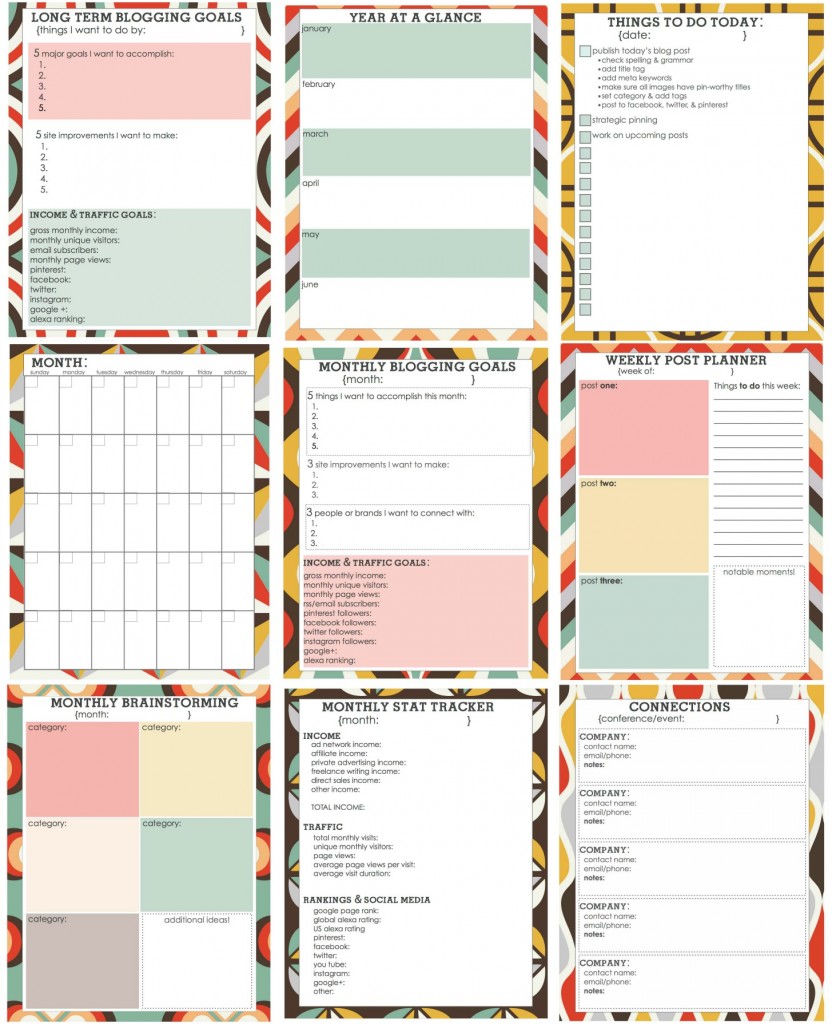
I am in the process of revamping my work schedule and part of that is planning blog content, events, tutorials and the like. In the process, I have come across some really nice printable blog planners that some of you might find useful. Here they are:

Blog Planner at Living Locurto


12 Blog and Social Media Planning Printables at MyMaySunshine


The LWSL Printable Blog Planner at Live Well Spend Less


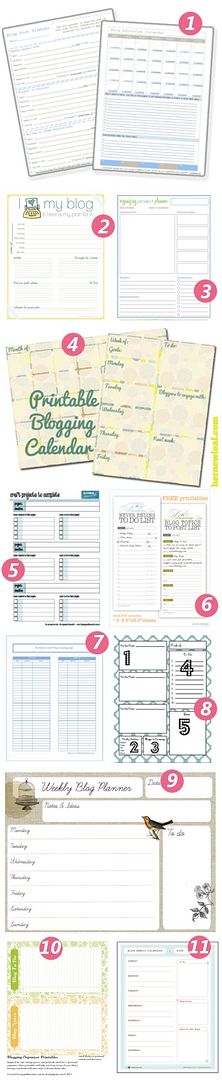
Links to 11 Different Printables at DIY Home Sweet Home


Did you know?  You can open .pdfs in Photoshop if you want to tweak these a little. Don’t like the heading? Cover over it with the same background color and fill it in for your own needs. These printables can be a great starting point for something that fits YOUR life and design business. Wanna see more? I pinned a bunch more here.

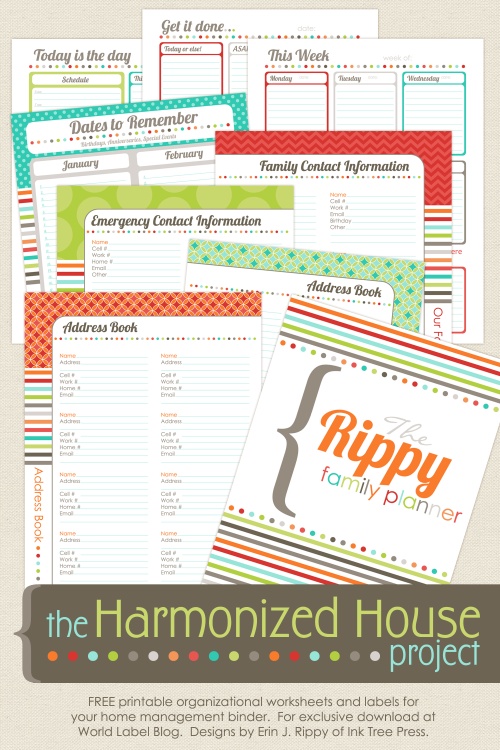
I built my whole home management binder from these printables that I slightly modified for categories and headings that made sense for me. (The monthly calendars can be edited to work for 2014 too!)


SALES
Scrap and Tubes_December Sale
kimc_cud